Structures and Flow
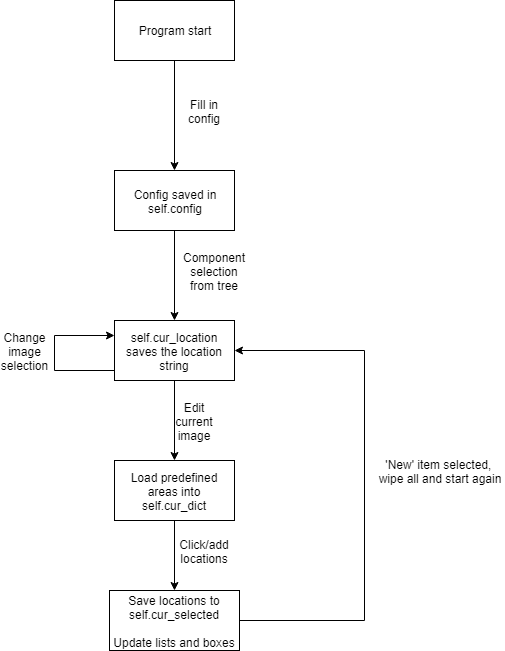
This section contains a description of the different structures used to store the information inside the program, as well as a description of the algorithmic flow from start to finish.
Structures
There are a few different data structures used throughout the program. Here we list them and give the layout and an example of use:
BoardItem
Defined in lib\selection_areas, this is a class containing all the fields we need to define a selectable item on any component.
class BoardItem:
def __init__(self, name, description, signal, direction, pad_type, coords, comments):
    self.name = name
    self.description = description
    self.signal = signal
    self.direction = direction
    self.pad_type = pad_type
    self.coords = coords
    self.comments = comments
We store all information about each of the components and generate the item. These BoardItems are then stored in component dictionaries:
ASIC = {
'BP1': BoardItem('XOFFRB', 'Data signal (bidirectional)', '160', 'I/O', 'SLVS',
                 [(1689.1, 1363.9), (1703.9, 1363.9), (1703.9, 1397.5), (1689.1, 1397.5)], ''),

'BP2': BoardItem('XOFFR', 'Data signal (bidirectional)', '160', 'I/O', 'SLVS',
                 [(1653.4, 1363.9), (1668.2, 1363.9), (1668.2, 1397.5), (1653.4, 1397.5)], '')
}
where the index of each BoardItem is defined by the user. In this case, BP stands for bond pad.
cur_location
Defined in lib\issue_tracking_gui, this is a str which gives us the current location of the user in the component
tree. It is built by appending all levels of the tree which lead to the current selected entry. For example, if the
user is currently at the HCC on the RH hybrid of a barrel module:
self.cur_location = 'BarrelRHHCC'
cur_selected
Defined in lib\issue_tracking_gui, this stores all the currently selected areas across all modules. The are stored in nested dictionaries, with the key for the first level being the cur_location string, and the content being a dict. The structure of the second dict is a key for the name of the area selected (i.e. ‘BP1’ or ‘Custom1’) and the content the BoardItem representing that area.
self.cur_selected = {'BarrelRHHCC': {'BP1': BoardItem('XOFFRB', 'Data signal (bidirectional)', '160', 'I/O', 'SLVS',
                 [(1689.1, 1363.9), (1703.9, 1363.9), (1703.9, 1397.5), (1689.1, 1397.5)], '')}}